.png?width=150&height=65&name=logo_tyto_robotics_2000_860%20(1).png)
When the air is at rest before a test, you should press the “Tare Airspeed” button that appears under the “Tare load cells” button on the left of the interface.
Our tests show that the sensor has an accuracy of 1% FS when tared but not calibrated. Although not necessary for most applications, you can also calibrate your sensor.
If you are calibrating your sensor, first select the displayed unit of pressure as mm of H2O (or as inch of H2O) in the “Setup tab”. Then go to the “Utilities” tab and connect the sensor as shown below. The blue parts of the drawing are water. You can use a large cup to contain the water. The distance “d” should be precisely measured. We recommend using a “d” of around 50 cm, but not more than 70 cm.
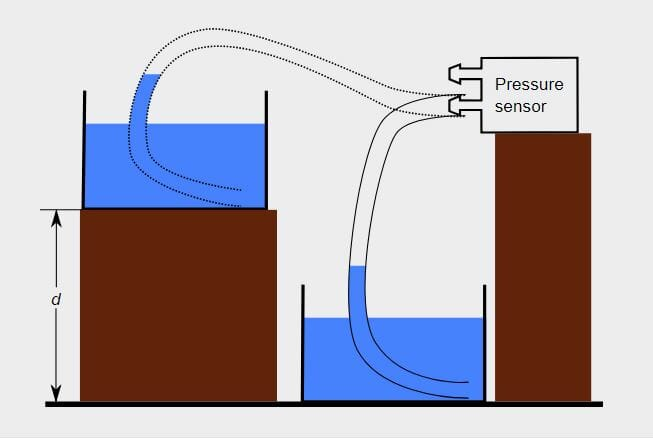
To calibrate the sensor:
- Place the water container with the tube on the lower surface as shown in Fig. 1.
- Press the “Tare airspeed” button.
- Place the water container on the higher surface. The distance d should be about 50 cm (20 inches) to minimize errors.
- Adjust the calibration coefficient until the pressure value matches the height difference “d”.