.png?width=150&height=65&name=logo_tyto_robotics_2000_860%20(1).png)
Please take note that only the Series 1585 is equipped with an accelerometer that can quantify the overall vibration on the main circuit. Please take note that the measured vibration is for reference only. Other products do not have the capacity to measure the vibration.
- Open the RCbenchmark GUI and go to the Safety Cutoff tab
- Please first verify the safety cut-off setting of the vibration value
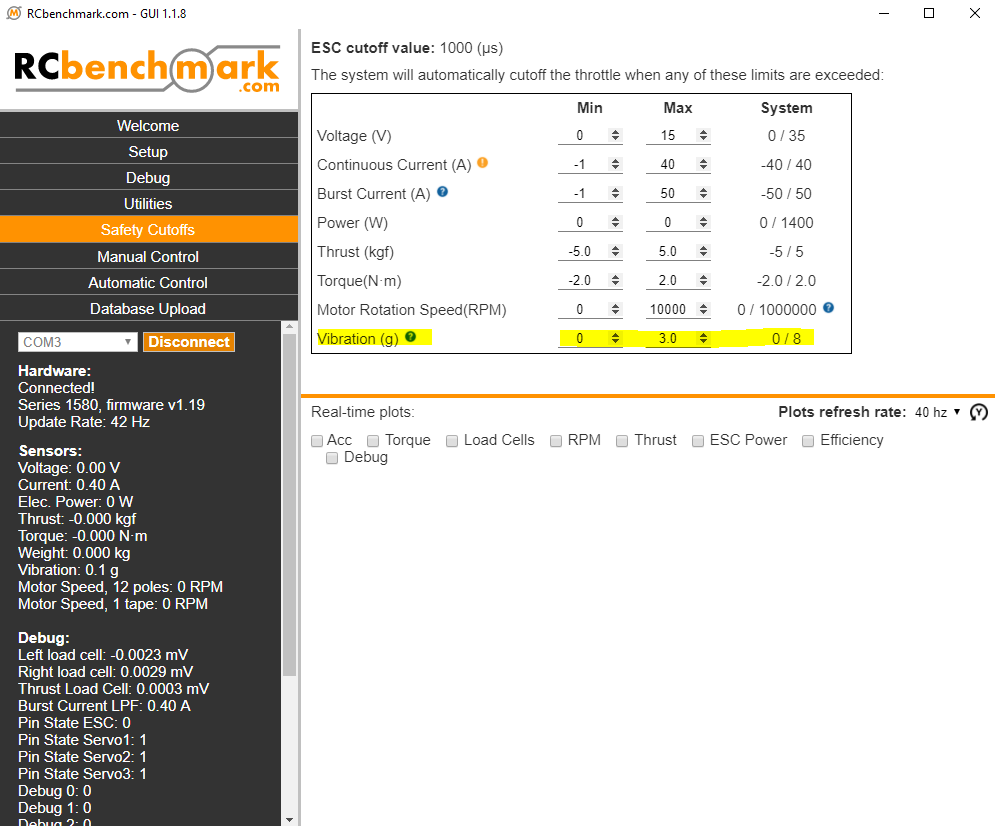
- In a normal circumstance, we recommend setting the maximum vibration up to 3 g.
- If you prefer setting safety cut-off to a higher value, that means you allow a higher vibration on the stand. Please bear in mind that severe vibration may damage the load cell or loosen the fasteners.
- If you have already set the vibration safety cut-off to the maximum 8 g but it still comes with a cut-off, depending on your physical observation towards the stand:
- If the stand does appear to be under severe vibration, please understand that this is the limit of the stand and it can be extremely dangerous when exceeding the safety limit. We recommend to better improve the propeller, the setup or check fasteners.
- If the stand does NOT appear to be under any vibration, there can be an issue with the accelerometer on the circuit. In this case, please send your case to support@tytorobotics.com and indicate the following info:
- Subject: Vibration cut-off but no physical vibration
- Send us the troubleshoot that you run
- Make an CSV file of the manual control and let the stand cut-off by recording the data itself
- Send us a video of the stand whether it is under vibration