.png?width=150&height=65&name=logo_tyto_robotics_2000_860%20(1).png)
- Please confirm the poles number in the RCbenchmark GUI -> Setup -> RPM Sensor -> Electrical RPM Sensor is correct. For detailed instructions on counting the number of poles in your motor, please press the question mark beside “Number of magnetic poles”

- You can get the number of poles from the specification of the motor you are going to test or by running the script, Get number of poles, in the Automatic control. You need to activate the scripting mode in the RCbenchmark GUI -> Setup -> GUI Settings -> Activate experimental scripting mode
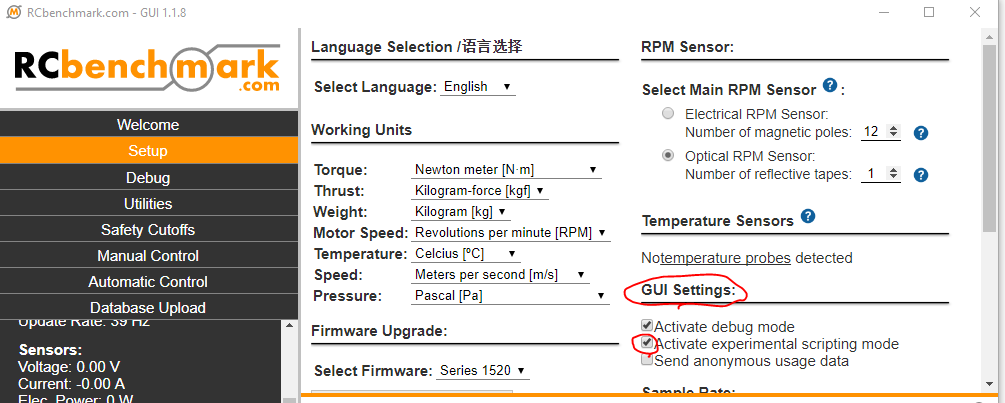
- Before running the script, please check the KV value you put to the script is correct. You can get this information from the specification of the motor.
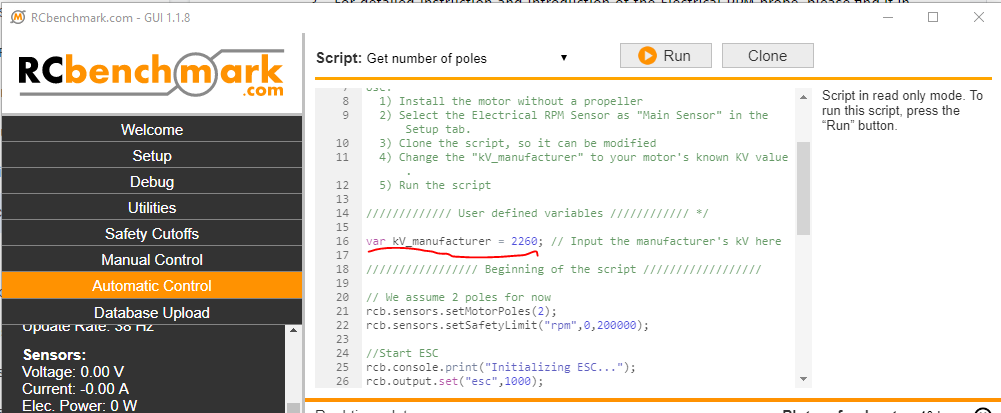
- After the KV is confirmed, please change the variable kV_manufacturer on the script to the KV of the motor and then run the script
- You can get the poles number from the report of the script and please enter this number to the “Number of magnetic poles” in the Setup Tab
- If you still find the reading of the RPM is wrong or see some abnormal RPM reading, like abnormal fluctuation reading, please send us the invoice when you purchased our product, the picture of the circuit, and the description of the issue you met to support@tytorobotics.com. We will give you suggestions for further troubleshooting and solutions for the issue you met.